
Couch to Claude
A 14-day plan. Two weeks. Ten minutes a day. Real work, not exercises.


I’ve watched a particular pattern play out many times in the weeks and months. An Executive reads a thread. Another Manager hears about someone saving five hours a week. A Marketing Lead promises to finally figure out what all the AI fuss is about. They open Claude with intent, ask it some questions that feel clumsy, get back answers that don’t quite fit, and quietly walk away by Thursday.
That’s not a willpower problem. The same person who can’t sustain an AI habit can almost certainly sustain a fitness habit — provided someone hands them a sensible plan instead of telling them to “just go run.” Couch-to-5K works because it’s progressive, daily, and small enough that you can’t talk yourself out of it. So I thought it might be helpful to build an equivalent for people aiming to get comfortable with the Claude Ecosystem: two weeks, ten minutes a day, real work instead of exercises.
By Day 14 you’ll have shipped real output, built your first Project, captured your voice, and crossed the line from “tried AI once” to “Claude is how I work.” That’s it. Two weeks. The whole entry price.
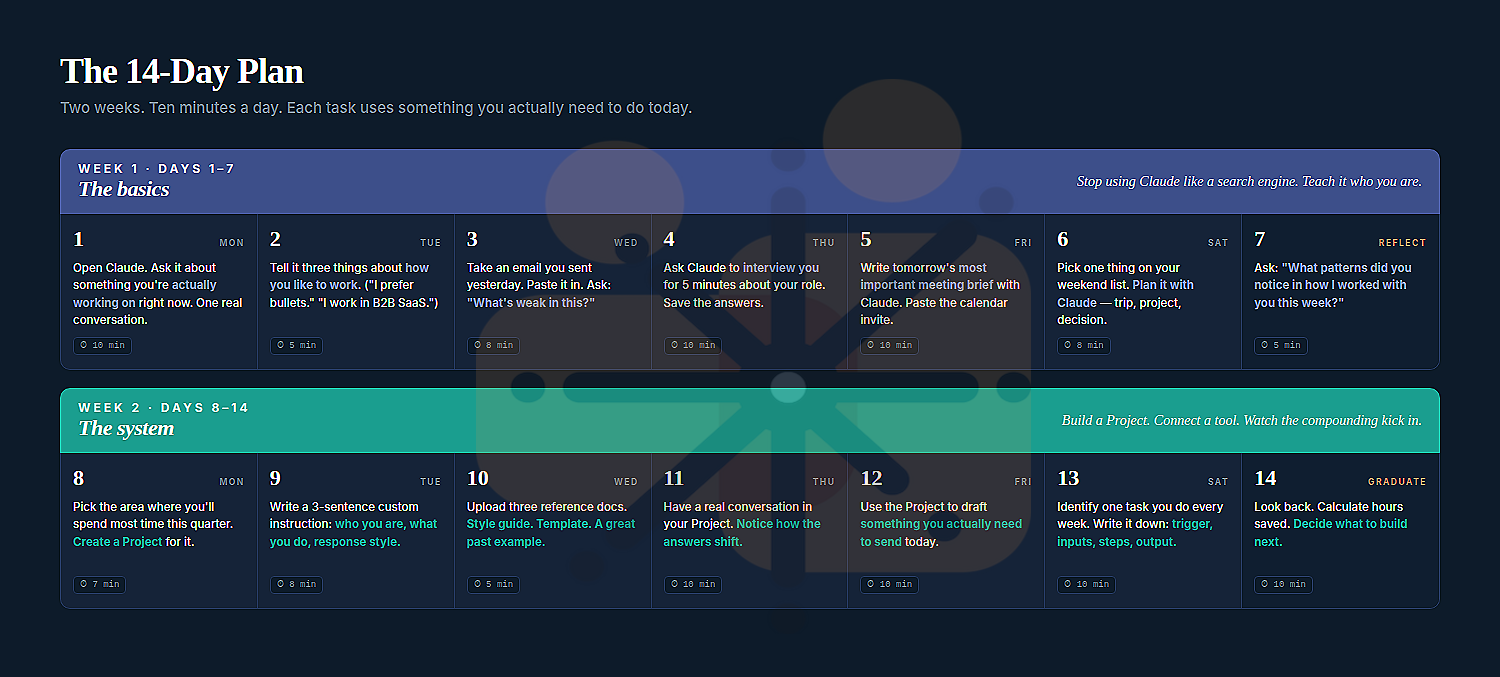
Week 1 — The basics
Most people use Claude like a search engine for the first six months and then conclude AI isn’t able to keep up to the hype. The first week is about breaking that pattern. You’re not going to use Claude as a smarter Search Engine (e.g. Google). You’re going to use it the way you’d use a sharp colleague — to think out loud with, push back on, get critique from. By Sunday it should know who you are, how you work, and how you like answers structured. You should never have to introduce yourself to it again.
The tasks below each take ten minutes or less, and every one of them is something you’d be doing anyway — an email, a meeting, a decision. That’s the rule for the entire programme. You don’t need to manufacture practice work. You need to fold Claude into work that already exists.
Day 1 — Monday · One real conversation (10 min)
Open Claude. Have one substantive conversation about something you’re actually working on right now — a problem, a draft, a decision. Not a test prompt. The thing that’s already on your mind.
What to expect: The first answer might feel generic. That’s fine. Push back, refine, ask again. You’re not training Claude — you’re training yourself to think out loud with it.
Day 2 — Tuesday · Tell it how you work (5 min)
Tell Claude three things about how you like to work. “I prefer bullet points to paragraphs.” “I work in B2B SaaS.” “I think in trade-offs — give me both sides before recommending.” Then ask: “Remember this for our future chats.”
What this builds: Memory. From now on, Claude will style its answers to match. You’ve stopped being anonymous to it.
Day 3 is where most programmes lose people. The temptation is to use Claude as a faster typist — paste in a draft, ask for a rewrite, ship the rewrite. Don’t. The far higher-leverage move is to use Claude as a critic first, generator second. It’s the difference between asking a colleague “can you write this for me” and “can you tell me what’s wrong with this before I ship it.”
Day 3 — Wednesday · Diagnose, don’t generate (8 min)
Take an email or message you sent yesterday. Paste it in. Don’t ask Claude to rewrite it. Ask: “What’s weak in this before you suggest changes?” Then read what comes back.
The lesson: Most people use Claude to generate. Power users use it to diagnose first, then improve. Today you learned the better instinct.
Day 4 — Thursday · Get yourself interviewed (10 min)
Ask Claude: “Interview me for five minutes about my role and how I think. Ask one question at a time. Be a sharp journalist, not a friendly one.” Answer honestly. Save the transcript — you’ll use it next week.
Why this matters: The transcript is your voice file. It’s what makes Claude’s writing sound like you in Week 2 instead of like a generic AI. Most people skip this step and wonder why their AI-generated content always sounds the same.
The Friday and Saturday tasks are designed to do something specific — prove to you that Claude is useful in two different contexts in the same week. The first is a high-stakes work moment. The second is something completely outside work. Habits don’t stick if they only live in one part of your life.
Day 5 — Friday · Use it for tomorrow’s most important meeting (10 min)
Pick the most important meeting on your calendar for the next three days. Paste the invite, the attendee list, and any prior context into Claude. Ask: “Help me prepare. What should I have an opinion on going in? What questions should I ask? What might I be missing?”
What you’ll notice: Walking into that meeting, you’ll feel a level of preparation you didn’t have before. The 10 minutes paid for themselves before you sat down.
Day 6 — Saturday · Use it on something non-work (8 min)
Pick one thing on your weekend list. A trip you’re planning. A project at home. A decision you’re sitting on. Talk it through with Claude like you would with a smart friend.
The trick: Habits don’t stick if they only live in your work hours. Today you proved Claude is useful outside the spreadsheet too.
Day 7 — Sunday · Hold up the mirror (5 min)
Ask Claude: “Looking back at our conversations this week, what patterns did you notice in how I worked with you? Where did I leave value on the table?”
You’re done with Week 1. Six real conversations behind you. Memory is set. You know the rhythm. The bigger build starts tomorrow.
Week 2 — The system
Week 1 was about breaking a habit. Week 2 is about building a system. The single feature that turns Claude from “occasionally useful tool” into “permanent change in how I work” is Projects — a persistent workspace where context, instructions and reference material live together. You set them up once. They compound forever.
The trap most people fall into here is what I call setup-tax inflation. They decide they’re going to do this properly, spend a weekend trying to design the perfect Project structure for every part of their life, get overwhelmed, and never actually start. The whole point of this week is the opposite. One Project. One area of your work. Set up incrementally over seven days, ten minutes at a time. By Sunday it’ll be live, useful, and producing real output.
Day 8 — Monday · Create your first Project (7 min)
Pick the area where you’ll spend the most time over the next quarter. A key account. A product launch. A recurring report. The board pack. Inside Claude, click “+ New Project” and name it. Don’t overthink the name.
One Project. Not five. The temptation to build a perfect taxonomy of Projects is the trap. Resist it. One, today, that you’ll actually use.
Day 9 — Tuesday · Write the custom instruction (8 min)
In your Project, find the custom instructions box. Write three sentences: who you are, what you do, how you want responses styled. Paste in your interview transcript from Day 4 if you want extra voice. Save.
Why three sentences: Most people write a thousand-word instruction nobody re-reads. Three lines you’ll actually maintain beats a manifesto you won’t.
Day 10 — Wednesday · Upload three reference docs (5 min)
Three files only. A style guide or example of writing you like. A template you use repeatedly. A great past piece of work. Drag, drop, done.
The rule: Three is enough. Don’t dump fifty files. Each unnecessary file adds noise that makes Claude’s answers worse, not better.
Day 11 is the day the curve bends. You’ll have spent four days on small setup tasks that probably feel like overhead. Today you’ll cash them in. You’ll ask Claude something inside your Project that you’d normally ask in a generic chat — and the answer will be visibly different. It’ll pull from your reference docs without you mentioning them. It’ll sound like you. That’s the moment most people quietly become AI-native — and once you’ve felt it, you don’t go back to generic chat for that workstream.
Day 11 — Thursday · Have a conversation. Notice the difference. (10 min)
Inside your Project, ask Claude something you’d normally ask in a generic chat. Notice the difference. It pulls from your reference docs. It uses your voice. It sounds like the smartest version of you.
This is the moment. The compounding just kicked in. You felt it.
Day 12 — Friday · Ship something real (10 min)
Use your Project to draft something you actually need to send today. An email. A brief. A note. A page of a doc. Send it (after a quick read-through).
The test that matters: Did Claude make this output meaningfully better than your solo version would have been, in less time? If yes — you’ve crossed over. If no — refine the custom instruction tomorrow.
The final two days are about looking forward, not back. You’re going to identify the next thing you build, but you’re not going to build it yet. The reason matters: discipline at the start of a habit is more important than ambition. Most people who burn out on AI do so because they bit off the next thing too fast. The graduation day isn’t a finish line — it’s a launchpad.
Day 13 — Saturday · Map your first Skill (10 min)
Identify one task you do at least once a week. Write it down: trigger, inputs, steps, output. Don’t build it yet — just write the spec. This is what becomes a Skill on Day 15.
What you’ve done: Identified your highest-leverage automation candidate. Most people never do this. You did it on day thirteen.
Day 14 — Sunday · Look back. Calculate. Decide what’s next. (10 min)
Open your Project. Scroll through the chats. Roughly tally how much time you saved versus the work you’d have done solo. Pick the next thing you want to build — but don’t build it today. Today is for noticing what just happened.
You graduated. Two weeks ago you’d “been meaning to use AI.” Today you have a working Project, your voice captured, real outputs shipped, and a roadmap. That’s not nothing.
Same plan, four flavours
The plan above works for everyone, deliberately. But the texture of Day 8’s “create a Project for the area where you’ll spend the most time” is wildly different depending on what you actually do.
For an executive, that’s probably their operating reviews or board prep. For a sales leader, it’s a pipeline or a set of key accounts. For a marketing team, it’s brand voice and the content engine. For a finance team, it’s the monthly close and the reporting pack.
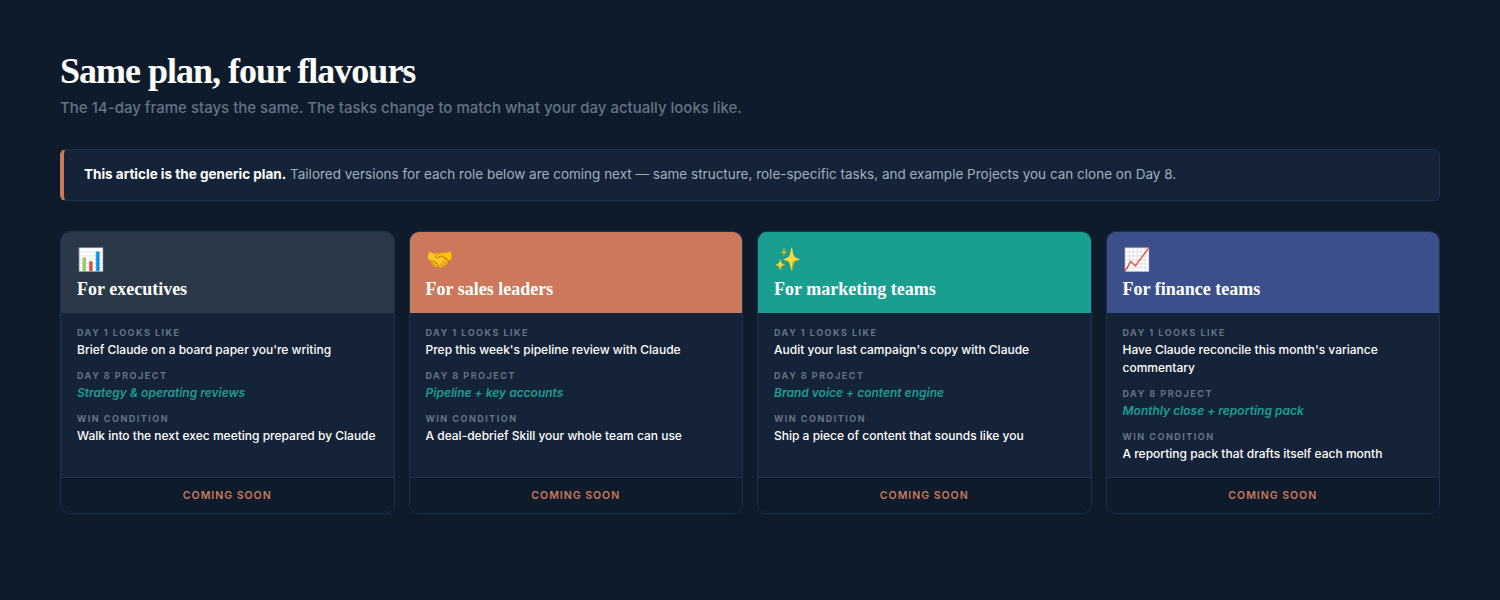
Follow up version of this plan can be developed, one for each of those four roles. Same frame. Role-specific tasks, example Projects you can clone on Day 8, and the small adjustments that matter most for each kind of work.
If that is of interest, connect with me and we can work on it together aligned to the needs of you, your team and organization.
Four rules that keep you on the plan
Whichever version you end up running — generic or tailored — the same four rules apply. They’re worth internalising before Day 1, because most people who quit a programme like this do so by violating one of them.
Ten minutes is the ceiling, not the floor. Days you have five minutes still count. Days you have thirty — stop at ten. The rhythm matters more than the volume. Ten-minute days you actually do beat thirty-minute days you skip.
Use real work, not exercises. Every task should map to something you’d be doing anyway. Practice runs are how programmes die in week two. Real work creates real stakes — stakes create attention — attention is what makes the learning stick.
Skip days happen. Skip weeks don’t. Miss a day, pick up where you left off. Miss three in a row, restart the week — not the programme. The difference matters. Restarting the week is honest. Restarting the programme is usually a polite way of quitting.
The compounding starts after Day 10 The first 9-10 days will feel like overhead. You’ll wonder if it’s working. Around Day 10-11 something flips. Don’t quit before the curve bends.
Day 1 is just opening Claude and asking it about something you’re actually working on. That’s the entire entry price.
Tomorrow you’ll do the next thing. Two weeks from now you’ll be a different kind of professional than the one reading this paragraph — not because the technology changed you, but because you spent fourteen days learning to work alongside it. That’s a trade most people would take. Most people just don’t know how cheap it is.